Monday, August 11, 2014

Http Error 401.2 - Unauthorized – Wordpress error solved

WordPress website can be shown 401.2 error on hosting website. Mostly 401.2 unauthorized error comes, when you host your WordPress website on locally.

Locally WordPress website hosted on wamp server. wamp server works as local server.
After installing wordpress website, you should run with http://localhost url.

Whenever port is not set correctly or blocked. at that time WordPress local host url showing error. - Http Error 401.2 – Unauthorized

Here i gives full solution on your problem, Http Error 401.2 – Unauthorized on WordPress website.

So read carefully and apply necessary changes in configuration file, installed in wamp server.

Step to solve http Error 401.2 - Unauthorized in WordPress


Before this, i explained WordPress install locally. Useful installation guide on bluehost, ipage and hostgator.

Step 1
Type Wamp in start menu search box. on result you will get "start wamp server". Click on it.

Wordpress installation error - 401.2, step 1
Step 2
Wamp server should be start in 2 to 5 seconds. From the bottom right corner you can open wordpress website.
Wordpress installation error - 401.2, step 2
Step 3
Just click on local host under the wamp server icon.

Wordpress installation error - 401.2, step 3

Wordpress installation error - 401.2, step 4

Step 4
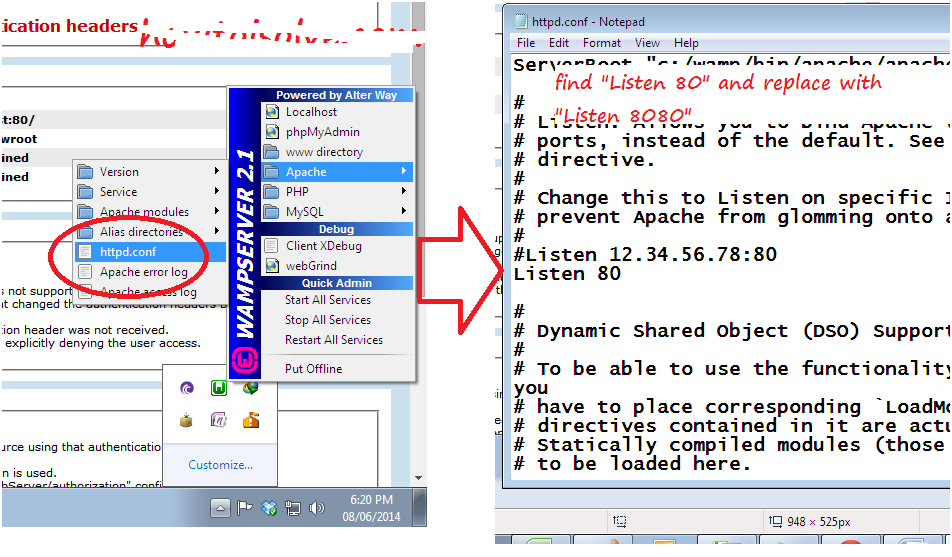
Now you got server error 401.2. now open httpd.conf file.
Apache > httpd.conf
Wordpress installation error - 401.2, step 5


Step 5:
From this find "Listen". you will get below screen.
Wordpress installation error - 401.2, step 6
Step 6:
Now change port number. And save file.
After changes saved successfully you must restart your wamp server.
Step 7:
Again try to open WordPress website in your browser locally. It should be open your WordPress website.

Wordpress installation error - 401.2, step 7
Your job has been done,
Related search for this post,
Solve Basic installation error in WordPress
How to solve WordPress error 402.1
Step to solve local host error

If you have any problem feel free and comment in below comment box. And get instant help from our side.


Saturday, August 9, 2014

How to see all sent Facebook friend request in Facebook

The world’s largest social network Facebook have many strict rule and regulation on sent friend request or tolerate unknown people by sending friend request. If you are sending more facebook friend request to number of unknown people to increase friends in your account. From this list sent by you, some doesn’t accept your request sent by your from your account. at that time Facebook algorithm work and might be your account has been banned for this reason, you sent more request to unknown people that’s all are pending. For the prevention, block you account due to reason of sent multiple friend request and most of the pending now.

Useful: How to stop all notification in your inbox.

So you have to delete all Facebook friend request sent by you in past from your account.

Here’s are the steps on how to remove or see all Facebook friend request which is sent you in past

Step 1: Go facebook.com

Step 2: Login with your username/ Email/ Mobile number and password.

Step 3: After successfully logged in your account.

Step 4: From the top bar in your account, Tap “friend request option” icon. You can see all friend requests coming from your friends.


See Sent facebook friend requests
Step 5: Click on “See all” from bottom menu.

Step 6: Your next page looks link in below, Tap on “View Sent request” link.
View Sent friend Request in Facebook

Step 7: After tap on “View sent request”. Your screen given in below.
View sent friends request sent by you - not accepted by your friends

Step 8: From this list, sent friend request you can cancel one by one.
Cancel pending friend request in facebook account

Useful: How to download Facebook video without IDM or any external apps?

Using above Facebook tips, you can also cancel or delete all Facebook friend requests, which is pending till now or not accepted by your friends.

Don’t miss: Awesome Facebook cover photo for your profile and page in 2014.

Make your Facebook secure: hide Facebook profile from unknown persona.

Don’t miss to comment this pretty and simply trick on how to view all sent friend request (Facebook) from your account.

Friday, August 8, 2014

Top best Keyword research tools for SEO (Search engine optimization)

Best Keyword research tools must help to gain more website search index in search engine. At the end of, you will improve your website health to retain actual output from the search engines and visitors. Here I giving list of foremost keyword research tools for SEO categorized on different category. All plugins must increase index in top most search engine, SERP (Search Engine Result Page) rank, Google index, Pagerank, Pageviews, Traffic. So you must simply use below plugins regularly in your article posting, get instant result in your hand, in short time duration.

Useful: Best directory submission sites for without reciprocal link.

Best Social networking sites for SEO and Online marketing

Top best Keyword Research Tools for SEO and article posting

1. Open Site Explorer

SemRush for Keyword
Open Site Explorer is best SEO tools to find the most popular keyword in your blog. Using these tools you can find best keyword ideas on your contact title and popularity on web. You can also increase your overall blog performance in short of time.

2. Google AdWord
Google AdWords keyword Tools
Google AdWords deserve second rank in best keyword research tools for SEO and quality article. Google AdWords gives the perfect result of your keyword research. Google AdWords plus points are country, location, language, Group ideas, and estimated cost of keyword, multiple keyword research. Keyword suggestion is the best option to get related keyword searched keyword.

3. SEMRush
SemRush for Keyword
SemRush for Keyword
To find future use keyword in your blog/website, you have to submit your website URL than target search engine that’s on your want to analyze. From there you can also get advertizing popularity, as advertiser and publishers.
Other useful Tools in SEM Rush
Becklinks
Keyword Research
Website Ranking
Organic search popularity

4. Alexa
Alexa keyword Research tools
Alexa also deserve position rank in best keyword research tools for SEO list. You can analyze your website/blog with first 30 days trial, after that purchasing small plan activation.
You can check another websites keyword by submitting URL, which you want to analyze.

5. StatsCrope
Status Crop
Status Crop
Status Crop
StatsCrope accessing whole website database, in result you will get all the data like popular keyword, SEO score, Domain Age, internal and external links, Becklinks.
To check particular keyword ranking in your blog/website: http://www.statscrop.com/tools/keyword-ranking/

6. Bing keyword Research Tools
Bing Webmaster
Bing Webmaster
Bing one of the best search engine to improve site visibility and get more visitors on your web. You can get most popular keyword in bing search engine related to your blog. Bing webmaster tools give result base on the criteria’s like, Country, region and language.
To use bing webmaster tools you have to login, after free registering yourself through Microsoft account.

Final dose - : To find most popular and effective keyword for your blog/website, You must have to use best keyword Research Tools from listed above. Because Keyword popularity is always updates on time and for different search engine.Don’t miss to share which is best for you in below comment box. If you have any problem comment also we will be glad to assist you.

Wednesday, August 6, 2014

How to install wordpress in local computer using wamp server

Install Wordpress on local machine is first stage to create websites or blog in free of cost. Before that you have to do some installation process. You can install wordpress on any platform locally like windows machine.
For that you can install wamp server in your local machine. Wamp makes your PC or Laptop as a server. Using this server you can install any wordpress theme and tools directly in single click. Here I have described all the process from installation to completed websites or blog in wordpress, in below.
Install Wordpress is so easy for any nontechnical person, who wants to build any personal website or blog. To create wordpress website just follow the below simple steps.
Create PHP websites, Wamp server is also useful. if you having any problem of wordpress installation, You can comment in below comment box.

Dashboard for locally installed wordpress

Wordpress installation Points will be covered - install wordpress

1. Install WAMP setup in your computer.
2. Install wordpress website
3. How to manage your wordpress website: Folder management
4. Add Wordpress website Database for wordpress website: Using MySQL
5. Open your wordpress website in browser.

1. Install WAMP setup in your computer.-install wordpress

First you have wamp server setup file.
You can download wamp server setup on it's official site: Click here to download: You shall download for 32 bit or 64 bit setup for different system.
http://www.wampserver.com/en/download.php
You can open wamp server from icon (hidden icon at bottom of your screen). After click on wamp server icon, you can see options give in below.
  • Localhost
  • PHPMyAdmin
  • WWW directory
Now, click on localhost. Your browser will show server access screen. You can see locally hosted wordpress website in browser screen. For the first time your screen looks like in below.
Wordpress install step for wamp server
Install Wordpress - WAMP server installation step 1
Install Wordpress - WAMP server installation step 2
Install Wordpress - WAMP server installation step 3

Install Wordpress - WAMP server installation step 4
Install Wordpress - WAMP server installation step 5
Useful: on wamp server, HTTP: 401.2 - Unauthorized error page
If you haven't any error, so congratulation for your successful installation on wamp server in desktop or laptop locally.
After successful install wordpress on local machine, your next step should be download wordpress setup.

2. Install wordpress website on wamp server - install wordpress

First you need to download wordpress setup from its official sites: www.wordpress.org (current wordpress version 3.9.1)
Wordpress install locally step 2 - 2

You will get wordpress in zip folder. After unzip wordpress file, you will get wordpress folder. Copy this wordpress folder and past it under wamp root directory.

Then click on wamp icon > localhost >
Wordpress install locally step 2 - 3

You can see your project (Wordpress website) will be show which is under the root directory. (In browser)
Wordpress install locally 2 - 4


Next: How to change wordpress theme from dashboard?

3. Add Wordpress website Database for wordpress website: Using MySQL

After click on website your you can see wordpress configration form given in below,
For that you need database for wordpress website,
Open your browser and give URL: localhost/phpmyadmin/

Now you can see mysql database. Create new database
Wordpress installation Guide on locally - Create a New database 3 - 1
Wordpress installation Guide on locally - Create a New database 1
4. Open your wordpress website in browser - install wordpress
In your first attempt, your screen looks like in below.
Submit Database name, User name only.
Wordpress installation Guide on locally step for sql connectivity

Click on run and install
Wordpress installation Guide on locally step for sql connectivity step 2


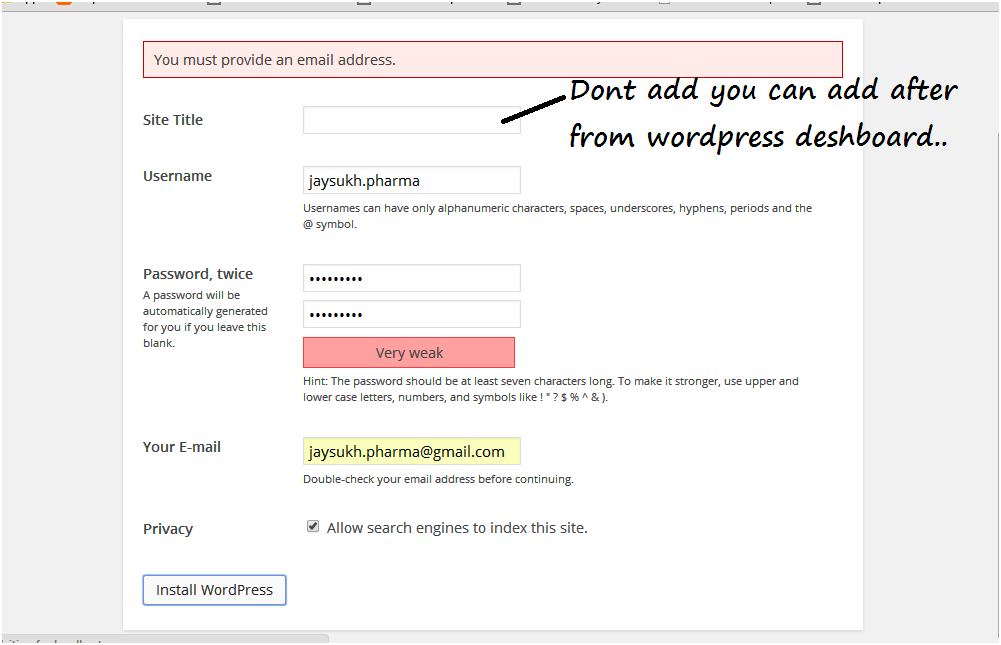
Now you have to enter wordpress website title (Not mandatory). User name, password and email address are required fields.
Download Wordpress for locally install step 3
Then click on submit,
Download Wordpress for locally install step 4
You can login with User name and password,
Login screen for locally installed wordpress
After successful login, you can see wordpress website dashboard. That is very very comfortable to customize your wordpress website or blog.

So thanks, Wordpress.
You have any problem in installation, manage multiple website, than comment in blow comment box.
We feel glad to assist you.
Thanks for visiting,

Tuesday, August 5, 2014

How to choose best domain name: Best domain name registration sites

best Domain name - you can buy blog or website's top level best Domain name in little investment with 3 digit count.After selecting best suitable best domain name for your blog or business website. You can purchase on best domain name registration sites given in below.Domain registration period might be in yearly or more time period registration available. After expiration date of domain name you have to renew any time online.
How to choose best Domain name

Points to be remembered before buying best domain name

So at first we have to focus meaning of your best domain name.

Meaning Full name

So at first we have to focus meaning of your best domain name. Visitors search from google search engine domain name attract the visitor to visit your blog or site.

Domain name level

This time hundreds of top level best domain name are available. You can choose any for as of your business type and blog topic.
Ex. .com, .org, .tv, biz is top level best domain name.

Choose exact extension behind Domain name

You have to choose perfect domain extension as of your country name.
.com (Most of the common for worldwide)
.pk (Leading domain for Pakistan bloggers)
.in (Leading domain for India bloggers)
.co.uk (United Kingdom or London)
.jp (For Japanese blog)
.cn (For china blog)
.biz
.tv (entertainment)

Easy to readable and remember

You should use below option in your domain name to read easy and remember.
You can use 1 to 9 digit in domain
Add prefix and suffix You, Your, My..
.org for nonprofit organizations site
.com for commercial sites
.net for networking sites

based on topic of your blog or website

Domain name helps on SEO(Search Engine optimization) when
your domain name is relative to subject of your blog .
So always choose SEO friendly domain name

Choose Shorter Domain name

length of best Domain name must be less than 67 characters.

Choose fresh domain name

You don't have to choose used domain name which is already used by others.

Don't choose on popular sites name

shouldn't choose domain name from popular sites name.
Ex, facebook, twitter act,

Don't use only keyword

After selecting best domain name. you should buy it on top best domain registrar sites online at any time.


Some of the hosting sites gives free domain name in hosting plan. so don't buy domain name before selecting hosting companies and plan. This is already providing free domain name credit in your account.
Related search:
How to find best domain name for blog or website
Choose best domain name
Key points to select best domain name.
Share your experience or ideas about this article: How to choose best domain name.

Monday, August 4, 2014

Google adsense alternatives 2014 for blogger and website – Make money Online

Google adsense alternatives are most powerful way to make money online through the blogging and website. In this time for new comers in blogging google adsense approval process is very hard. You have to use any of them given in below list. That can assist as google adsense alternatives. From Google adsense alternatives you can approve your blog easily. After applying in other adsense alternatives, you should earn slightly lower income as compare to Google adsense.
Google adsense alternatives

Here top best five Google adsense alternatives in 2014

1. Media.net

Media.net is new one in Google adsense alternatives 2014 list. Media.net now it’s not open for you but you can request for your blog and website in its official site. Media.ner collaborated top search engine yahoo and Bing. If you got successes in Media.net approval process than you should earn massive income as compare of Google adsense.
Media.net pays to you in your paypal account or Bank account (wire transfer) after $100 of threshold money.
To sign up in Medai.net click here

2. Bidvertiser

Google adsense alternatives – Bidvertiser is second option in lists of 2014. Bidvertiser do not band your account in any case. So you can earn exact income which is in your Bidvertiser current money in your account.
Bidvertiser gives option to make suitable ads for your blog also. Advertise banner formats are Banner, Link, Mobile Ads, Slider ads.
Bidvertiser do payment to you after $10 of threshold amount.
To sign up in Bidvertiser click here

3. Chitika

Google adsense alternatives – If you are not approve your blog in above two options. You must apply in chitika. Because chitika will do your blog approvals process fast as compare to other. Chitika also give good amount as of your blog impression.
To sign up in chitika click here
Ad design types for chitika are Text, Banner and mobile.
Chitika do your payment through check($50) or paypal($10).

4. infolinks

infolinks is slightly different as compared to other two Google adsense alternatives.
it will show ad in popup format. infilinks gives option to create ad text link, banner, frame also.
Chitik pays through check, paypal to the advertiser.
To signUp in Chitika click here

5. QaDabra

Google adsense alternatives - Qadabra is popular through different ad style as compare to other alternatives.
Qadabra gives ad for first 15 seconds. after that you shall continue do your job on blog as a visitor.
Qadabra give video types of add that run for first 15 sec
Easy signUp in Qadabra click here.
Qadabra gives wide options of payment to the advertisers. mode of Payments are paypal, Check and Wire transfer.in blogging has to be hard as compare to old time Google adsense approval.

6. Kontera

Google adsense alternative - Kontera is alternative option of infolink. Kontera gives popup ad. when visitors hover on linked text then ad will be shown on blog page.
Modes of Payment are check, PayPal or wire.
For all modes of payment minimum threshold amount are $50.
Other Google adsense alternatives are given in below. You can use any of them.

7. Link Worth
8. Intellilinks
9. Reachli
10. BuySellAds

Don't miss to share google adsense alternatives useful with your friends.
Related Search:
Google adsense alternatives
Best Google adsense alternatives in 2014
After Google adsense banned Google adsense alternatives foe blog
How to make money with best Google adsense alternatives?
Share this useful article with your friends. and subscribe our social media page to get daily updates.
Please, comment your experience in below comment box. Which is most suitable for you?

Friday, August 1, 2014

best affiliates program in USA (United State) UK (United Kingdom) – Make money Online

Best Affiliates Program in USA and UK make more opportunity to earn and gain lot of income in short time period for all publishers over the world wide. In today time Affiliates make more option as alternatives of top adverting program like google adsense, Yahoo advertising network. At the starting stage for business promoting own business at low cost these categorized affiliates program is more convenient for your professional business over internet. All best affiliates are new for you but today’s they served millions of advertisers and publishers are happy with them in United States and United Kingdom. To know more you can visit and read users experience on its official site. So advertisers always find the faultless affiliates in top level countries over the world including united state and United Kingdom, London ect.best affiliates program.


List of best Affiliates program sites for USA and UK

Link Share

best affiliates program - Link Share joined over 10 millions of people worldwide mostly in USA and UK. Link Share always manages Advertisers, Publishers, and Agencies all the way through its wonderful service. Main features include long term relationship with Advertisers and Publishers, Daily reporting. Overall today it deserve at no 1 position.

Commission Junction

best affiliates program - Commission junction serves service mostly in North America. Commission junction connected with advertisers, Publishers and Universities. Commission junction connects publishers with top level brand over motto behind make money online in easy way. To take part of commission junction you can register yourself in free as a publishers and advertiser easily.

ShareASale

best affiliates program - ShareASale is the most popular affiliates program in Chicago. ShareASale in Chicago share its service over 2600 customer. ShareASale has getting good response by best feedback on user experience.

Amazon Associates Affiliates

best affiliates program - Amazon Associates deserve at 4th rank in best affiliates program to make money online. Amazon provides hundreds of new verity to get huge income from share attractive advertising on your website. In front of publishers, advertisers are also happy with its service behind success. Note: You should earn huge income through pay per sale program in Amazon Affiliates program.

Google affiliates Network

best affiliates program - Google affiliates advertisement best way to earn huge income in fewer efforts. Google adsense gives earn money from advertise google ads on your websites and for advertiser can advertise after selecting target custom using geo location over the world at low cost.

ClixGalore

best affiliates program - ClixGalore is well-known affiliate’s program providing company in Australia. More over his user located in US, UK and Australia. ClixGalore pay your advertising amount in US dollar only. ClixGalore impressed by its service including PPM (pay-per-impression), PPC (pay-per-click), PPS (pay-per-sale) and PPL (pay per lead).

PeerFly.com

best affiliates program - PeerFly is providing free training for new advertisers. Peerfly prompted top companies over the world. You can know more about on its official site. PeerFly one and only giving reward in short of time period here

Click Bank

best affiliates program - Click Bank deserve at number 8 position in top best Affiliates for US and UK. You can read service like Affiliate payouts, Sell Online, Customer Support, Rich Analytics. Other two Best Affiliates programs online are,

MaxBounty

NeverBlue.com

Related Search:
How to make money online with Affiliates network in US and UK? Top best affiliates network for US and UK. Top most revenue earning sites for affiliates networks. Don’t miss to share your experience with best affiliates advertising network from the above list of best in US and UK top countries. Or don’t miss to share this post with your friends. If you have any question than we will be glad to assist you. Thanks Visit Howtoisolve.com