Friday, July 11, 2014

How to set password in Microsoft excel file at open file in your computer

This time security is requiring losing data and cheating by unknown people. So one of them is set password in your Microsoft excel file. So in this tutorial I try to set maximum option to make your excel file secure and password protected. In previously I share on how to recover data in Microsoft office document file from unexpected close.

Useful: Set minimum auto save time in Microsoft office document.
Save your word file in PDF format directly without any software.

Here you can saved your excel data in two different ways gives In below, Total secure and partial security

Access password: Set password to open file in your computer
Read only security: Make your file read only
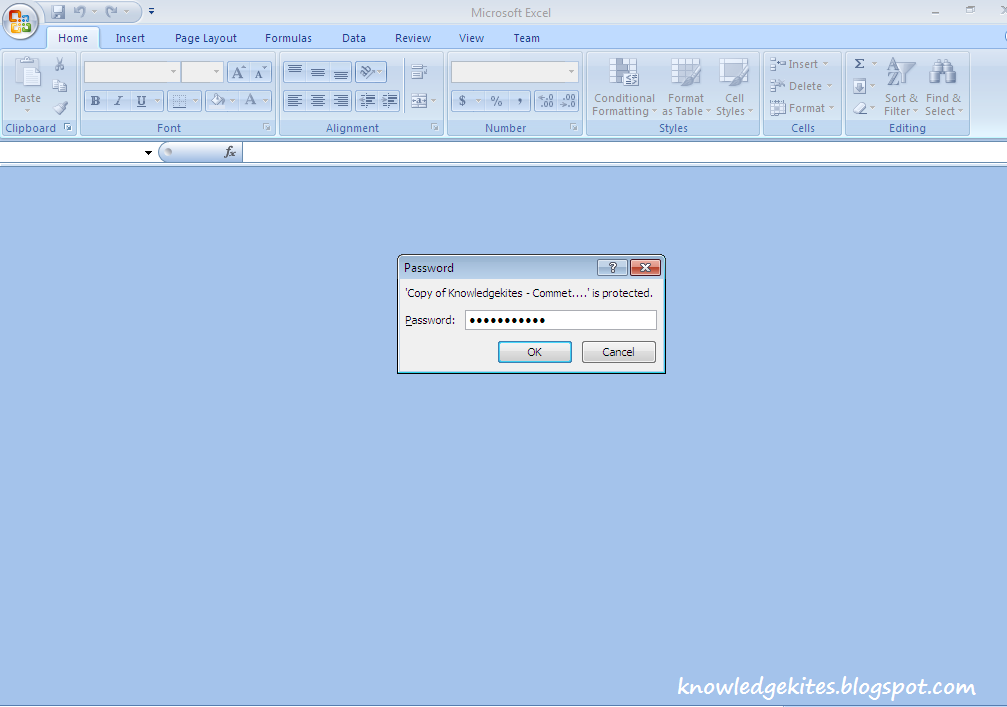
Password set in excel file to protect data
Set password to open your Microsoft excel file
Below step you have to follow for open file in secure way. To open file you must have to enter password.

Step 1
Click on review from the top tab,
Go review > Protect Workbook > Protect structure and windows
Enter password that you have to enter open excel file.
Set password to open Excel file from windows device
Re-enter same password for verification match

Re enter password for open excel file
Step 2
Click on office button (from top left corner of the screen),
Go, office button > Prepare > Encrypt document
Enter password same that entered in step 1
Make your excel file more secure with encrypt document option
- Enter password second time for verification.
Set password for encrypt excel doc

Set password for read only access

Steps to Make your file read only: To edit or change password require to do so follow the below steps.

Step 1
Go review > Protect Sheet
After that you can see dial box with multiple options, From there you have to enter password which you want to set,
Set password in Excel to protect data
Reenter password dialog box to verify password.
Re enter password to set password in Excel

Above security protect your data, no one can add and delete data from your Microsoft office excel file.
Excel protected with editing in file
Related search,
Make excel sheet password protected,
How to hide data in excel from unknown users

Don't miss: Convert Gmail email in PDF format directly.

If you like this how to guide, Don’t miss to share with your friends. You have any problem related to this article than comment in below comment box.

Thursday, July 10, 2014

How to add Meta tags inside head tag of wordpress website php code file

More over webmaster and SEO master always find the way to add meta tag inside head section of wordpress website. You can also check meta tags important on your website traffic directly from top best search engines. Know more about meta tag from official site click here. From this post you can learn about why we have to add meta tags inside wordpress website and how to add meta tags in inside head section of wordpress body.

Don’t miss: Top best free directory submission site for website.

Using this methods you can also add google analytics code inside head tag of wordpress website.

Note: Using this method for add meta tags in side head section you don’t need any meta tags wordpress plugins.
Add meta tags inside head tag

Why we have to add meta tags in head section of wordpress php file

1. Meta tag guide to search engine for indexing with time to time.
2. Meta tag defines description, title and author of website or blog.
3. It also helps to blog some url from search engine for all time.
4. Meta tags have hundreds of name and value parameters.

Steps to add wordpress Meta tag inside head tag of wordpress website through code – without plugin

Step 1
From the dashboard go
Appearance > Editor
From that you have to open functions.php file.


Open function file of your WordPress website

Open Functions php file from side files


Step 2
Go functions.php file from righ side bar of wordpress dashboard. (Given in below)
image
Past below code in function in side php tag. Given in below.

function add_meta_tags() {
echo '<meta content="index, follow" name="robots" />';
echo '<meta content="1 days" name="revisit-after" />';
echo '<meta content="all" name="robots" />';
echo '<meta content="all" name="googlebot" />';
echo '<meta content="general" name="general" />';
}

add_action('wp_head', 'add_meta_tags');
Meta code inside function php file

Step 3
After adding file click on save button file
Now you are done,

Related search:
• How to add bing meta tag inside head file in wordpress.
• How to add more than one meta tags inside head in php code file.

Useful: Top best keyword density checker tools for your blog or website.

I hope you have solved your solution. If you are not able to add meta tads inside head section on wordpress code file than comment in below. If you like this article on your search how to add meta tag inside php code file don’t miss to share.

Wednesday, July 9, 2014

How to work on freelancer.com: steps to bid open project at your home

Freelancer paid job from your home make to earn money from learning at your home. You have experience on particular field like software development, website development, SEO work, Marketing, Data entry and other 50+ job type available on freelancer. You can earn lot of money from thousand of new project shared by client over worldwide. From the freelancer you can earn money in international currency over worldwide. To earn money from freelancer you don’t have to pay money to me or freelancer official site. You can takeover much money from 30 day trial period and free bid points with new account opening. Don’t west time in your school and collage time duration? More over friends can’t find and search on this topic that I want to share with kind helps.

Useful: you don’t know these best ways to make money online from easy way, now.
Don’t miss: Get free talk time in your android mobile. Earn extra money from instagram.

Importance of bid points in freelancer

More bid point gives chance to get more work in your interest, To take project or task by client which is uploaded as project. To get one project you need 1 bid point.
Ex: you have 30 bid points that you can participate in 30 different projects in your cart maximum.

Steps to bid and work on freelancer, Make money from freelancing job


Step 1
Go freelancer.com from here, register yourself with correct information. Your are register with freelancer that login with email and password.

Step 2
After registration verify your accounts from your registered email address available in mail inbox. Through verification you can get extra bid points in your freelancer accent.

To get more bid points and level kindly submit all required details.

Step 3
Move project category type that you want to do as of your time limitation and categories.
Go Brows project > Select project that you want to find (Brows category if best to find)
See all the steps given in below.


Work on freelancer com brows project

Wide verity of project and job on freelancer


Step 4:
Select project that you want to do.

Successfully add project as bid in freelancer account

place bid on freelancer project from your account
do Bid on project on selected category
Step 5:
Bid project if you are eligible to do this project in time. Otherwise bad impression makes you work hard to find big project on freelancer.com
Useful: Make money with blogging for all time.

Related,
Make money from freelancer,
Step by step guide to bid on project and work in freelancer.
How to work at home in freelancer?

Thanks for reading, I hope you must enjoy this post as of you find. So comment in below comment box if you have any suggestion and problem. We will be glad to assist you.

Monday, July 7, 2014

Top Best Keyword density checker tools to improve SEO score and traffic in your website or blog

Best Keyword density checker tools, to find Keyword density is very important to improve SEO score in correct way. We must have to use top keyword finder tools listed in 2014. Keyword density checker tools calculate keyword from your whole post that’s include post title, post content, post URL, post alternative tag. After counting all the word, at the end of reply on your keyword you can find percentage of keyword you are using. Using these Best Keyword density checker tools you can find keyword in percentage of keyword you have used.

Useful: Best social networking site that’s never miss in blogging.

As rules of SEO master, best customized post with keyword contained 2 to 3% of the keyword has been used in whole post. You are not using keyword in post in this ratio then you’re writing and post is poor in front of search engine.

Best Keyword density checker tools in 2014


Millions of people, Blogger and webmaster using these keyword density checker tools. i listed top best four keyword density checker tools in briefly.

1. SEO Book, Best keyword density checker tools

SEO book keyword checker tools online, Using this tools you don’t need any installation. You can manage your article and make SEO friendly easily. SEO book gives very fast result as compare to other SEO checker tools over internet.
Best keyword density checker tools
To know your own keyword density from whole blog or website. You have to submit URL of your blog only in text area field.

2. SEOCentro Keyword Density Tools

SEO Centro keyword density tools is most popular keyword analyzer tools to analyse keyword in your website or blog. Using this tool you can get decision on which keyword you have to use to balance between most popular search term keyword in top best search engine.
Most popular Keyword checker tools

3. Keyword Density checker

Small keyword density checker tools, This tools gives more option as compare to above two keyword density checker tools. From this post you have to add some text in text area and keyword which you want to find. Before that you have to submit URL of your blog or website.
Keyword Checker tools free

4. Keyword Density analyzer

Keyword density.com, from this tools you can get total keyword density from two different URL. As a result you can analyze keyword you have entered in text field in below of the two URL box.
Keyword Density analyzer
Useful: Best SEO tools and plugins for wordpress and BlogSpot blogging.

After Daily use of top best above keyword analyzer tools you must use google analytics. You know other best tools, give comment in below comment box.

Friday, July 4, 2014

Best apps and ways to hide Apps on android from unknown people

Android Apps like Gaming, Online buying, banking apps must be placing in secure from unknown people. In latest android version Application hiding option are available built in, for that you don’t need to install and other hiding apps. But you have lower version of android OS version, you must have application hiding apps. That’s given in below.

To hide application, here I explain different two (methods) ways for android mobile.

Useful: Play any android game on Mac OS X, Step by step guide.
              Access your PC on android mobile remotely.

Best ways to hide/lock apps in android mobile

Method 1: Without any application hide installed application

Without install any message hiding application

1. Open the app Gallery in your mobile.

2. Tap the right click menu in your Mobile. And select “Hide applications” options. After selecting this option you can multiple check option on each application.

Hide Android app from android mobile- ways to hide apps


3. Now select apps you want to hide from App gallery. After selecting app from app gallery click ok button.

If you want to unhide selected app which hiding, you should have follow the reverse process.

Method 2: Best Apps to hide Application

Using locking hiding app, Second ways to hide message. But in this several drawbacks are ahead. But you can use it easily.
Drawbacks of to use application hiding apps: To hide apps from app gallery
Lock app is the best application to hide application in application browser in secure way.
Step 1
You can download hide/lock apps from google play store: here
After downloading apps, install it in your android mobile.

Step 2
Open Lock app in your android mobile, at the first time you have to set password for your apps. Which helps to make your mobile secure.
Lock or hide apps from your android mobile
Step 3
Now your next step should be select application that you want to hide/lock with your password.
Now it can’t open without password that set in app lock.
Select application - You want to hide from app browser

Useful: How to resize or scan passport size photo without scanner?
              Step by step guide on Play any android game on PC or laptop.

Now your job is done,
It helpful to you, so don’t miss to share it with your friends.

Wednesday, July 2, 2014

How to stop and turn off Facebook notification email in Gmail, Yahoo and Bing

Today’s largest social networking Facebook, Most of the people are using Facebook for business, Social networking, Business promotion and chatting with friends, and family over worldwide. So when ever new updates are comes in your account as a notification. Notification mail sent on register email iD in your Facebook account. This mail auto set by default is yes. Now you have to disable this option using below steps, to stop or disable Facebook mail comes in your mail account.

Useful: How to hide mutual friend from Facebook side bar in Facebook profile.
Ways to increase Facebook page likes
Download any Facebook video without any software, Directly in your browser
How to see sent Facebook friend request and cancel friend request?

Steps to stop mail notification in Facebook account


Step 1

Go facebook.com, Login with your email or password.

Step 2

Click on setting gear icon at top right corner of your desktop screen. Given in below,
Select Account settings option given there (Dynamic popup)
stop Facebook notification mail

Step 3

Now click on notification tab in the account settings.
Account Settings > Notifications
Click notification under setting to stop Facebook mail

Step 4

After that, Next screen will be what types of notification you want to stop forever. Like post, group, friend request.
Now click on Email with edit link in front of this, (Given in below image)
set email notification settings

Step 5

After click on edit, you can see all notification types with radio options. To stop or disable email notification you have to check third option given in below figure.
Select mail option for Account security and privacy
you want more guide on this tutorial or any problem comment in below, we will glad to assist you.

Tuesday, July 1, 2014

How to turn off Facebook notification for particular Facebook game notification or group or pages

Friends, you are very irritant on Facebook notification, but you can stop notifications that are coming from game request, New post on page and groups. First time I very angry from these types of request coming from our friends as a notification. Notification gives suggestion to participate in this game to get more coin or points in game. After follow the below step your must stop all unwanted and unnecessary request coming from unknown or friends profile.

Useful: How to hide mutual friend from Facebook side bar in Facebook profile.
              Ways to increase Facebook page likes

              Download any Facebook video without any software, Directly in your browser

How to see sent Facebook friend request and cancel friend request?

Steps to stop notification in Facebook coming from game updates, New post on pages and group

Step 1

To stop notification those are coming on continuously time. To stop particular notification you have to in front of the notification in same category, and click on cross button that will be show when you hover there.

Through the single click you can stop all the same categories notification for all time
That’s give in below,
In below screen you can stop all notification that’s coming from howtoisolve.com page.

Press Stop button after click on cross button
Step 2

After click on “x” button, ask for turn of as double verification.
Click on “Turn Off” otherwise click on “Keep on”.
Stop notification click on Turn Off given in below screen.
Stop facebook notification for all time coming from game and post, pages

Its done, From this tricks you can stop all particular notification of game, Apps, Post, Group and pages updates notifications.

More over friends are sending notification for to join group and page. Now a days Facebook notifications are coming in double number through the candy crash and zynga poker game.
To know more on Facebook tips and tricks state you on with Us, Through connect our social page, Facebook, Google+ and twitter.

Mute Facebook notification and chat sound from your Facebook profile
How to block Facebook [social sites] in your laptop or desktop browser
How to make scanned photo without scanner in your mobile

Don’t miss to share this very useful post with your friends. You have any confusion and advance tips comment in below comment box.